Skip to content

Cloud Coding Agents for Ambitious Teams

Define your dev environment, tools, and automations once. Run any frontier agent in the cloud.

  • Works with
  • Claude CodeClaude Code
  • CodexCodex
  • CursorCursor
  • OpenCodeOpenCode
  • PiPi
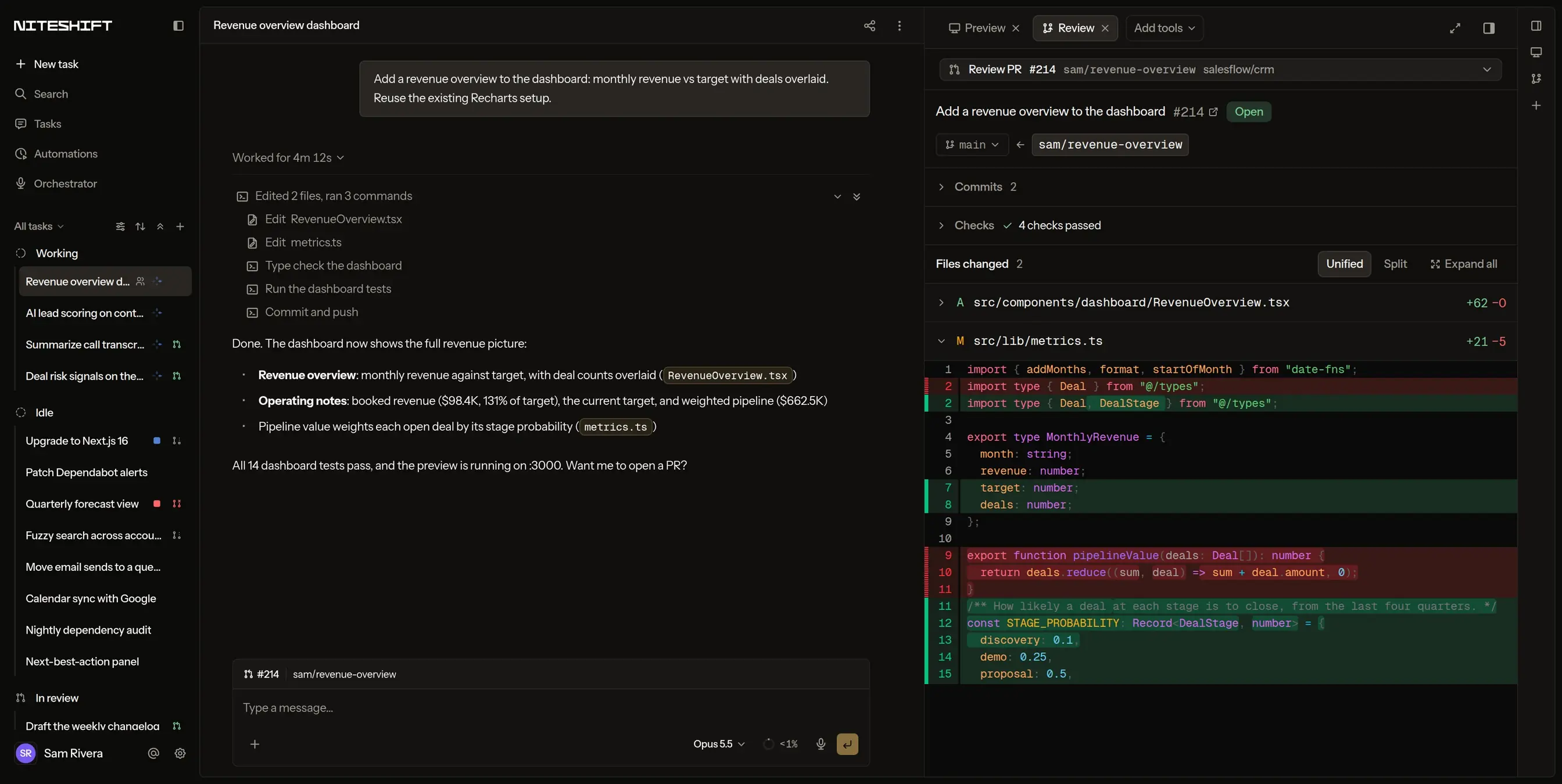
A Niteshift task: the agent's finished transcript for a revenue dashboard change, beside the Review panel showing pull request #214 with its checks passed and the diff

Why teams ship on Niteshift

“What makes Niteshift really stand out is how effortlessly safe it is to prototype with. We fire off fully formed specs and early ideas – both get us meaningfully closer to launching in prod by having something we can interact with and talk about together. Now, the whole team, from design to GTM, is building.”
Jeff AndersCo-founder, AmbrookRead the case study
“Our engineers point the agent at an eval script and let it run for hours optimizing our whole codebase on Niteshift.”
Florian JuengermannCo-founder, Listen Labs
“Niteshift is the only platform we found that can spin up the services needed to simulate our robots end to end. Our engineers ship faster, and our designers can work directly in code on the real system.”
Evan BeardFounder & CEO, Standard Bots
“Working with the Niteshift product and team has been truly excellent. We've been able to increase productivity with highly customized cloud configs, zero lock-in when it comes to coding agents, all while getting super fast turnaround times on new feature requests.”
Mike ChenHead of Engineering, NavigateAI

Configures your whole stack

Niteshift sets up your complex environment and maintains it for the whole team.

acme/payments · Environment
TasksPreviewReviewArtifacts
.niteshift/services.yamlsetup agent is writingwritten by the setup agent
# Detected from docker-compose.yml, package.json, and CIservices:  postgres: { image: postgres:16, seed: scripts/seed.ts }  redis:    { image: redis:7 }  worker:   { command: pnpm worker }  web:      { command: pnpm dev, port: 3000, healthcheck: / }mobile:  ios:      { scheme: Acme, simulator: iPhone 17 }auth:       { type: magic-dev-login-url, path: /__dev/login }# Checked: services healthy, web answering on :3000, sign-in works
Support: #acme-niteshift on Slacksupport@niteshift.dev

Always on in the cloud

Spin up infinite environments without RAM limits. Kick off tasks from anywhere, including Slack, Linear, and GitHub.

acme · all repos
TasksPreviewReviewArtifacts
Running now0 tasks · 0 sandboxes · 0 laptops
SlackSample report for the empty dashboardWorkingPreview ready
LinearFix the flaky checkout testWorkingPR #482
GitHubAddress review on the billing PRWorking
Web appPrototype the onboarding checklistWorking
APIRegenerate the pricing screenshotsWorking
ScheduleNightly ranking evalWorking
CLIAdd CSV export for refundsWorking
WebhookTriage the new Sentry issueWorking

Bring your own agents

We’re building the absolute best cloud stack for your agents to achieve their goals. For every model and harness.

acme-dashboard · New task
TasksPreviewReviewArtifacts
Choose an agent for this task
Claude CodeClaude CodeOpus 5.5
CodexCodexGPT-6.1 Sol
CursorCursorGrok 4.7
OpenCodeOpenCodeKimi K3.1 Pro
PiPiAny model
Bring your ownOpen-source
Same environmentSame toolsSame skillsSame secrets

Verify your agents’ changes

Your agents run your app, fix CI failures, and verify every change works, so you can just ship.

acme-dashboard · Sample report
TasksPreviewReviewArtifacts
Add a sample report to the empty dashboard7 files+312−48#486
preview.niteshift.devWebiPhoneiPad
Verification0/6

0 of 6 checks passed

VerificationRun by the agent
  1. App runningweb · worker · Postgres · Redis
  2. Created a report in the browserChrome
  3. Built from the account’s own data90 days
  4. Holds up on iPhone and iPad3 layouts
  5. Tests31 passed · 6 new
  6. Server logs0 errors
Share reportReady to merge

Multi-agent orchestration

Niteshift agents can spin up new sandboxes as needed to support scaled experimentation or sub-agent delegation.

acme-dashboard · Six looks for reports
TasksPreviewReviewArtifacts

Try six looks for the reports page. One task each, and send me a preview of every one.

I'll create six tasks, one per look, each in its own sandbox.

Create task#1 Midnight365 ms
Create task#2 Terminal237 ms
Create task#3 Pastel250 ms
Create task#4 KPI header244 ms
Create task#5 Glass231 ms
Create task#6 Big type258 ms

Created 6 tasks, each in its own sandbox.

All six previews are up. #4 KPI header is closest to the brief; the rest are linked below.

Automate the work you don’t want to do

Set up automations for bug fixes and feature requests. Run campaigns for long-term goals, like reducing frontend latency.

acme/ranking · Nightly ranking eval
TasksPreviewReviewArtifacts
Nightly ranking eval12 variants, each in its own sandbox
+0 pts
Baseline
Variant 3
Variant 5
Variant 7
Variant 9
Variant 12
Ran 2 h 10 m overnightResults and configs saved as artifacts
acme/payments · Environment
TasksPreviewReviewArtifacts
.niteshift/services.yamlsetup agent is writingwritten by the setup agent
# Detected from docker-compose.yml, package.json, and CIservices:  postgres: { image: postgres:16, seed: scripts/seed.ts }  redis:    { image: redis:7 }  worker:   { command: pnpm worker }  web:      { command: pnpm dev, port: 3000, healthcheck: / }mobile:  ios:      { scheme: Acme, simulator: iPhone 17 }auth:       { type: magic-dev-login-url, path: /__dev/login }# Checked: services healthy, web answering on :3000, sign-in works
Support: #acme-niteshift on Slacksupport@niteshift.dev

Put your coding agents to work

Point Niteshift at your repo to wire up your full stack: services, auth and seeded data. Then ship verified PRs from Slack, Linear, or GitHub.

Frequently Asked Questions

Something else? Read the docs or Email us.

Which agents can I use?

Claude Code, Codex, Cursor, OpenCode, Muse Code and Pi. Pick the right agent for each task. Each gets its own isolated environment, with the same tools and services.

Where does each task run?

In its own isolated cloud environment, with your repositories, running services and tools, so the agent works the way you would locally.

How do I get started?

Connect GitHub and pick your repositories. A setup agent works out how to install, run and verify your project, and opens a pull request with the configuration. The agent has a live preview of your app running in about half an hour.

How does billing work?

You pay for the time agents spend working, by the minute. Idle sandboxes cost nothing. Every plan includes monthly usage, then continues pay-as-you-go.

Tokens are separate: bring API keys or a subscription from any model provider, and model usage goes through that provider.